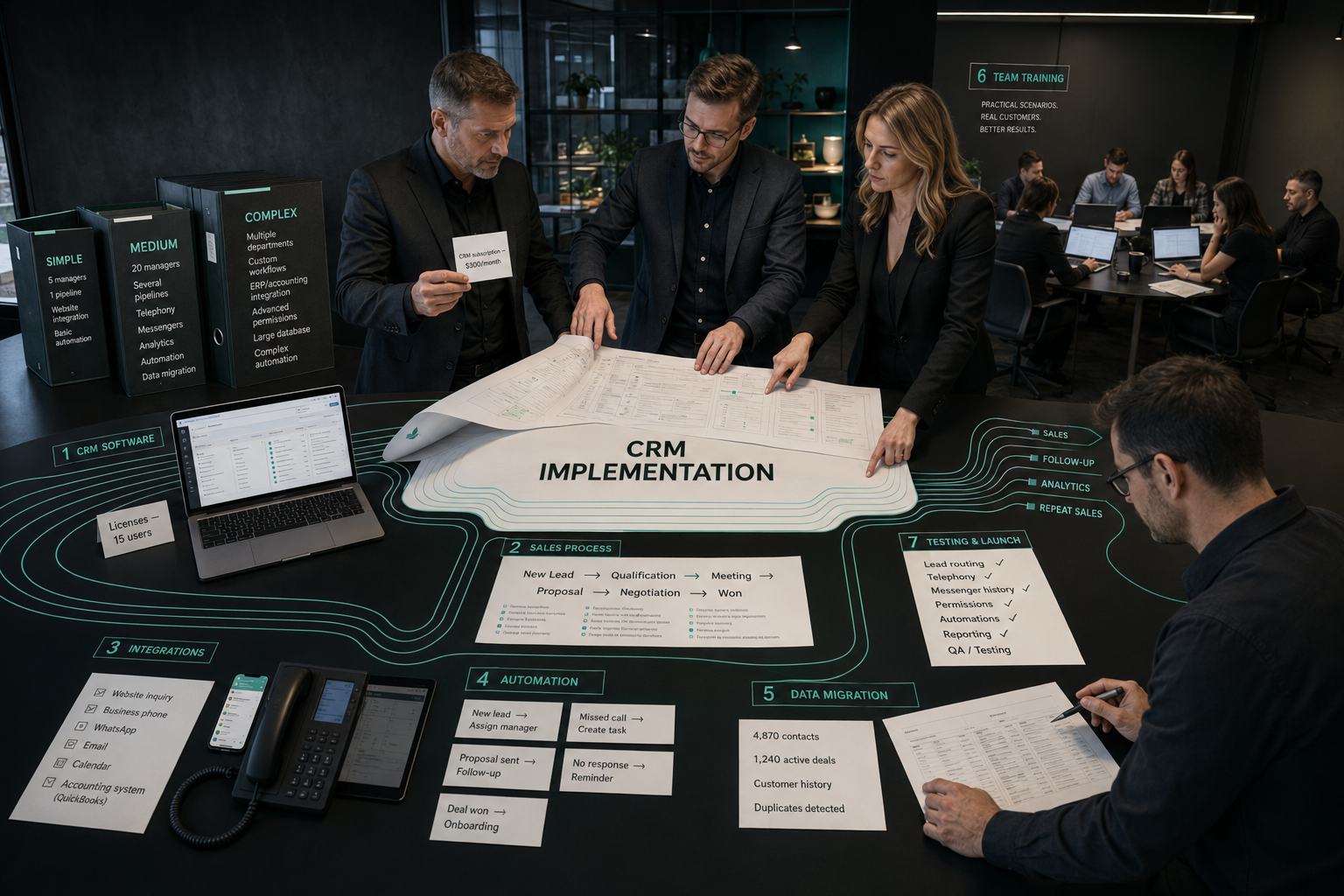
How Much Does CRM Implementation Cost and What Is Included in the Budget?
CRM implementation can cost anywhere from a relatively small setup fee for a simple sales pipeline to a much larger budget for a system with custom processes, integrations, automation, data migration, analytics, and team training.
The important point is that CRM implementation cost is not the same as CRM subscription cost.
A company may pay a relatively small monthly license fee and still spend significantly more on the actual implementation because the system has to be adapted to the way the business sells.
A realistic CRM budget usually includes several layers:
CRM license + process design + configuration + integrations + data migration + automation + training + ongoing support
The more complex the sales process is, the more implementation work is usually required.
That is why asking “How much does CRM cost?” without describing the business process rarely produces a useful answer.
A better question is:
What should the CRM control after implementation?
If the answer is only “store contacts,” the project can be simple.
If the CRM needs to capture every lead, distribute inquiries, control response time, automate follow-up, connect advertising with revenue, manage repeat sales, and provide reliable management reporting, the scope becomes much larger.
CRM License and CRM Implementation Are Different Costs
This distinction is often missed.
The CRM vendor usually charges for access to the software. The implementation team charges for making that software work inside the business.
The license may depend on:
- number of users
- selected plan
- available features
- storage
- automation limits
- communication channels
- advanced analytics
- AI features
Implementation is different.
It can include:
- sales process audit
- pipeline design
- CRM configuration
- user permissions
- custom fields
- lead routing
- task automation
- integrations
- data migration
- dashboards
- team training
A business should therefore calculate the total cost of ownership, not only the monthly software fee.
What Does a CRM Implementation Budget Usually Include?
1. Sales Process Audit
The strongest CRM implementations usually begin before the CRM itself is configured.
The team first needs to understand how the business currently handles a lead from first inquiry to payment.
That means mapping:
- traffic and lead sources
- first response
- qualification
- sales stages
- proposals
- follow-up
- contracts
- payment
- repeat sales
- lost deal reasons
This stage is important because CRM should reflect a good sales process, not simply copy the current chaos into software.
If a business cannot clearly explain how a deal should move forward, the CRM will not solve that problem automatically.
2. Pipeline Design
One of the main implementation tasks is defining the sales pipeline.
Weak CRM setups often use vague stages such as:
- New
- Working
- Thinking
- In Progress
- Closed
These stages do not clearly show customer progress.
A stronger pipeline might reflect actual commercial actions:
- Inquiry received
- First contact completed
- Lead qualified
- Meeting scheduled
- Proposal sent
- Decision pending
- Contract agreed
- Payment received
The exact pipeline depends on the business model.
A company with a two-day sales cycle does not need the same structure as a B2B company where a deal takes several months.
More complex pipelines require more implementation work because rules, fields, automations, and analytics must be built around them.
3. CRM Configuration
After the process is designed, the system itself has to be configured.
This may include:
- deal stages
- contact fields
- company fields
- custom statuses
- required fields
- tags
- permissions
- user roles
- lead assignment rules
- pipelines for different services
- task templates
- lost deal reasons
Simple configuration can be relatively quick.
Complex businesses may need several pipelines for:
- new sales
- repeat sales
- partner deals
- enterprise clients
- different regions
- different products
The more exceptions the business has, the more difficult CRM configuration becomes.
4. Number of Users
CRM budget is often affected by the size of the team.
More users can increase both:
- software license costs
- implementation complexity
A five-person sales team is usually easier to configure and train than a company with 50 users across marketing, sales, customer success, and management.
Larger teams may require:
- different permissions
- different dashboards
- department-specific pipelines
- approval workflows
- management access
- role-based automations
The implementation team also has to test how information moves between different roles.
5. Lead Sources and Integrations
A CRM becomes much more valuable when leads enter it automatically.
Businesses may need to connect:
- website forms
- landing pages
- Telegram
- Facebook and Instagram
- call tracking
- advertising platforms
- booking systems
- chatbots
- external lead-generation services
If leads currently arrive in five different places and someone manually copies them into CRM, automation can remove a major operational risk.
But each integration adds setup and testing work.
The CRM has to capture not only the contact itself, but ideally also:
- source
- campaign
- landing page
- service
- UTM parameters
- original message
- assigned manager
This information is what later allows the business to connect marketing with sales.
6. Telephony and Communication Integration
Sales teams often need CRM connected with communication tools.
This may include:
- cloud telephony
- call recording
- SMS
- messenger integrations
- conversation history
The objective is to keep customer communication connected to the deal.
Without this, managers may speak with clients in external applications while CRM contains incomplete information.
This makes management reporting unreliable.
Communication integration can increase the project budget because every platform has its own technical limitations, API options, and subscription costs.
7. Data Migration
If the business is already operating, existing data may need to be transferred into the new CRM.
Data can come from:
- another CRM
- spreadsheets
- email databases
- accounting software
- legacy systems
- multiple sales files
Migration is rarely just “import the Excel file.”
The database may contain:
- duplicates
- incomplete contacts
- inconsistent field names
- old deals
- outdated companies
- missing sources
- incorrect phone numbers
- different data formats
Before migration, the data often needs to be cleaned and mapped.
The larger and messier the existing database, the more expensive this stage can become.
8. Sales Automation
Automation is one of the main reasons businesses implement CRM.
A CRM can automatically perform predictable actions such as:
- assign new leads
- create tasks
- send notifications
- trigger follow-up
- remind managers
- detect stalled deals
- send meeting reminders
- update statuses
- request missing information
- launch reactivation workflows
But automation only works well when the underlying process is clear.
If the company has not defined what should happen after each stage, adding automation can simply make the chaos faster.
This is why workflow design can become a meaningful part of the implementation budget.
9. AI Integration
Some CRM projects now include AI functionality.
Examples may include:
- automatic lead qualification
- AI summaries of calls
- suggested replies
- conversation analysis
- AI assistants
- automatic data extraction
- lead scoring
- sales call analysis
AI can reduce manual work, but it also introduces additional requirements:
- integration
- prompt logic
- access permissions
- testing
- quality control
- usage costs
It should be added where it solves a measurable problem, not simply because AI features are available.
10. Marketing Attribution
For businesses investing in advertising, CRM can help answer a critical question:
Which marketing channel actually produces revenue?
This requires correct source tracking.
A strong setup may connect:
Traffic source → Lead → Qualified opportunity → Deal → Payment → Revenue
Implementation may include:
- UTM tracking
- lead source mapping
- campaign data
- advertising platform integration
- CRM revenue data
- conversion tracking
Without this layer, marketing may continue optimizing cost per lead while management still does not know which campaigns create profitable customers.
11. Dashboards and Reporting
CRM should help management understand the sales system without manually collecting information.
Useful dashboards may include:
- number of new leads
- response time
- qualified lead rate
- conversion between stages
- sales by manager
- pipeline value
- sales cycle length
- lost deal reasons
- revenue by source
- forecasted revenue
A simple CRM may need only several standard reports.
A more complex business may require custom dashboards and calculations.
The amount of reporting required directly affects implementation scope.
12. Team Training
A perfectly configured CRM still fails if the team does not use it correctly.
Training may cover:
- how to process a new lead
- when to move a deal
- which fields must be completed
- how to create tasks
- how to record loss reasons
- how to use automations
- how managers read reports
Training is especially important when the company is moving from spreadsheets or informal messenger-based sales.
The goal is not simply to teach employees where the buttons are.
They need to understand the sales rules the CRM is designed to enforce.
13. Testing Before Launch
Before CRM goes live, the full process should be tested.
For example:
A lead submits the website form.
Does the lead enter CRM?
Is the source recorded?
Is the correct manager assigned?
Is the first task created?
Does the manager receive a notification?
Does the automation start?
Can the deal move correctly through the pipeline?
Does management see the result in the report?
Testing all of these scenarios takes time but prevents expensive problems after launch.
14. Ongoing Support and Optimization
CRM implementation is rarely finished permanently on launch day.
After the system starts being used, the business may discover:
- unnecessary fields
- missing automation
- incorrect stages
- new lead sources
- reporting gaps
- integration failures
- new sales scenarios
For that reason, businesses should consider whether the implementation budget includes:
- post-launch support
- error correction
- workflow optimization
- new automation
- staff questions
- periodic audits
The cost of CRM should therefore be evaluated over time, not only as a one-time project.
Indicative CRM Implementation Budget Levels
There is no universal market price because CRM implementation varies dramatically by country, platform, team size, and business complexity.
The following levels should be treated as planning examples, not market averages or fixed Birch prices.
Basic CRM Setup
Suitable for:
- a small team
- one simple pipeline
- few lead sources
- minimal automation
- no complex migration
The project may include:
- pipeline setup
- basic fields
- user access
- simple lead assignment
- several automations
- basic training
This is the lowest-complexity implementation type.
Standard Sales CRM Implementation
Suitable for businesses that need CRM to actively manage sales.
The project may include:
- process audit
- several pipelines
- website integration
- lead routing
- follow-up automation
- telephony or email integration
- dashboards
- migration
- training
This usually requires significantly more work than a simple software setup.
Advanced CRM and Automation Project
Suitable for:
- larger sales teams
- multiple departments
- complex customer journeys
- several integrations
- advanced automation
- custom analytics
- AI workflows
In this case, CRM implementation becomes closer to a full business-process automation project.
The budget should be estimated after mapping the actual process rather than choosing a package based only on user count.
A Model CRM Budget Example
This is an illustrative example, not a Birch client case and not a market benchmark.
Imagine a service business with 10 sales users.
The company receives leads from:
- website
- paid advertising
- phone calls
The business wants:
- automatic lead capture
- lead assignment
- response-time control
- qualification stages
- proposal tracking
- automatic follow-up
- lost deal reasons
- marketing attribution
- management dashboards
- employee training
The total implementation budget would consist of:
Software licenses
Recurring CRM subscription for 10 users.
Process analysis
Audit of the existing sales process and pipeline design.
Configuration
Fields, stages, users, permissions, lead routing.
Integrations
Website, communication channels, advertising and telephony.
Automation
Follow-up, alerts, overdue deal control, notifications.
Analytics
Conversion, response time, manager performance, revenue sources.
Training
Sales team onboarding and management reporting.
This example shows why CRM budget cannot be estimated correctly from software pricing alone.
The license is only one component of the full system.
What Usually Makes CRM Implementation More Expensive?
Budget usually increases when the project has:
- more users
- several sales teams
- several pipelines
- complex permissions
- many lead sources
- large data migration
- custom integrations
- telephony
- messenger integrations
- advanced automation
- AI functionality
- complex reporting
- custom development
- multiple countries or departments
The main cost driver is complexity.
The more unique business rules that CRM needs to support, the more time is required to design, configure, integrate, and test the system.
What Can Make CRM Implementation Cheaper?
CRM implementation becomes easier when:
- the sales process is already clear
- one pipeline covers most deals
- lead sources are limited
- data is clean
- the team uses standard CRM functionality
- few custom integrations are required
- management agrees on the process before implementation
One of the most effective ways to reduce CRM cost is to simplify the business process before trying to automate it.
Automating ten unnecessary steps is more expensive than removing eight of them.
Hidden CRM Costs Businesses Often Miss
The implementation quote is not always the full cost.
Consider additional expenses such as:
- CRM subscriptions
- telephony fees
- SMS
- WhatsApp providers
- AI usage
- email services
- automation platforms
- API costs
- paid connectors
- technical support
- future configuration
- additional users
The total CRM budget should include both implementation and recurring infrastructure.
How Long Does CRM Implementation Take?
The timeline depends on complexity.
A simple CRM setup may be completed relatively quickly.
A larger project requires several stages:
- Sales process audit
- Requirements
- Pipeline design
- CRM configuration
- Integrations
- Data migration
- Automation
- Reporting
- Testing
- Team training
- Launch
- Post-launch optimization
The implementation often slows down when the business itself has not agreed on its sales process.
If different managers use different stages, rules, or definitions of a qualified lead, those disagreements need to be resolved before automation is built.
How to Compare CRM Implementation Proposals
Do not compare only the final price.
Check what each proposal actually includes.
Process Design
Does the implementation team analyse how the company sells?
Or do they simply configure the CRM based on instructions?
Pipeline
Is the pipeline designed around real customer progress?
Or are generic CRM stages being installed?
Lead Sources
Are website forms, calls, messengers, and advertising connected?
Automation
Which repetitive processes will be automated?
Data Migration
Is migration included?
Does it include data cleaning?
Analytics
Will management be able to see sales conversion and revenue by source?
Training
Is team onboarding included?
Support
What happens after launch?
Additional Costs
Which integrations, subscriptions, and services are paid separately?
Two CRM implementation proposals can have very different prices because they solve completely different amounts of the problem.
CRM Implementation Checklist
Before approving the project, confirm:
- Sales process has been mapped
- CRM goals are defined
- Pipeline stages are clear
- Qualification criteria are agreed
- Lead sources are listed
- Response-time rules are defined
- Follow-up logic is documented
- Required integrations are listed
- Existing data has been evaluated
- Required dashboards are defined
- User roles are documented
- Automation priorities are identified
- Training is included
- Post-launch support is clear
- Recurring software costs are understood
How to Calculate the Real CRM Budget
A useful planning formula is:
Total CRM Budget = Software + Process Design + Configuration + Integrations + Migration + Automation + Training + Support
For more advanced projects:
Total CRM Budget = CRM + Sales Process Redesign + Integrations + Automation + Analytics + AI + Ongoing Optimization
This is a more realistic way to estimate the project than multiplying the monthly license price by the number of users.
When CRM Implementation Pays Off
CRM should not be implemented simply because “every serious company needs one.”
It should solve measurable business problems.
For example:
- leads are being forgotten
- response times are too slow
- managers work differently
- follow-up is inconsistent
- management cannot see the pipeline
- marketing sources are disconnected from revenue
- repeat sales are not controlled
- sales reports are prepared manually
When these problems exist, CRM can reduce operational losses and make sales more predictable.
But the objective should not be “implement CRM.”
The objective should be something more concrete:
reduce lost leads, improve response speed, increase follow-up consistency, and give management reliable sales data.
Conclusion
CRM implementation cost depends much more on business complexity than on the software itself.
A simple CRM setup can be relatively inexpensive when the company has one sales process, few users, and minimal automation.
A larger implementation becomes more expensive when CRM needs to connect marketing, communication channels, sales, automation, analytics, and management reporting into one system.
Before requesting a CRM quote, map how a lead moves from first inquiry to payment. Identify which steps are manual, where deals are lost, which systems need to exchange data, and what management needs to measure.
Birch approaches CRM implementation as a sales-management project rather than a software installation. The objective is to build a system that captures every lead, controls the next action, reduces manual work, and shows where revenue is actually being created or lost.
If you are planning CRM implementation, start with a sales process audit and a clear list of required integrations and automations. That will give you a much more realistic budget than choosing a CRM plan first and trying to adapt the business to it later.